
Automate Active Directory auditing with n8n and ETC Collector
ETC Collector is a security auditor for Active Directory and Microsoft Entra ID written in Go: a single static binary, no agent, no dependency, no .NET, no Python. It runs 500+ security checks mapped to 9 compliance frameworks.
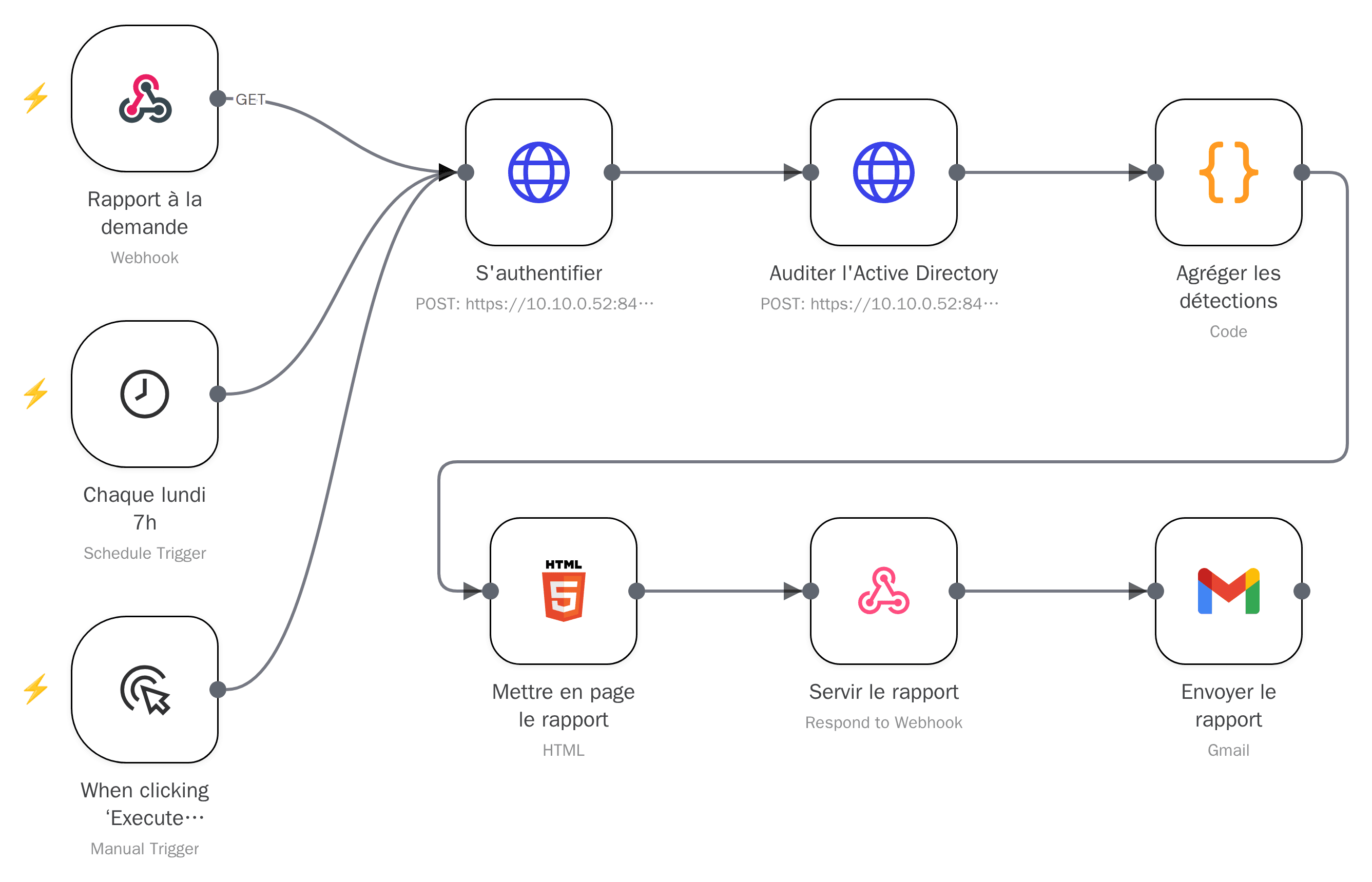
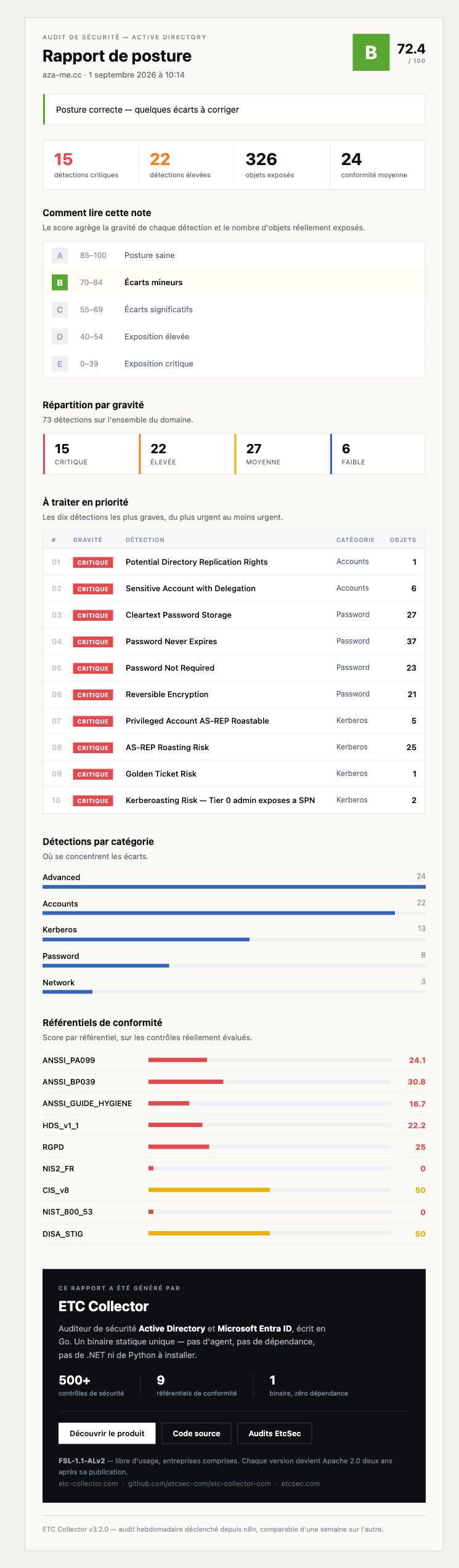
This n8n workflow triggers the audit through the API, aggregates the results, lays out a graded HTML report from A to E, and emails it. The subject line carries the grade and the number of critical findings, so you can triage without opening it.
The value isn't the single report, it's the repetition: Monday's cron compares one week against the last and surfaces drift. It isn't just another report.
Six steps, one graded report, delivered
Every run follows the same chain, whether it's triggered manually or on a schedule. Nothing is left to interpretation between the audit and the email you receive.
Trigger
An HTTP webhook or a weekly cron starts the workflow, your choice.
Authentication
n8n authenticates to the collector with a dedicated header token (X-GUI-Token).
API audit
The workflow calls the collector's API to run the Active Directory and Microsoft Entra ID audit.
Aggregation
n8n aggregates the raw results returned by the collector.
HTML layout
The report is laid out as HTML, with an overall grade from A to E.
Response and delivery
The workflow responds to the web call and emails the report; the subject line carries the grade and the critical count.
Install the collector and wire up n8n, step by step
The guide runs in three parts: A installs the collector on Linux (recommended), B covers the Windows alternative, C wires the result into n8n.
The source code is published on GitHub (links at the bottom of the page), release v3.2.0. Every command below was verified on a clean machine: Ubuntu 22.04 for Linux, Windows Server 2022 for Windows.
- A Linux amd64 server or a Windows Server.
- A read-only Active Directory service account.
- An n8n instance that can reach the collector.
- 1
A1 · Download and verify (Linux)
Downloads the Linux archive and its checksum file, then verifies the archive's integrity with sha256sum.
bashVERSION=3.2.0 BASE=https://github.com/etcsec-com/etc-collector-com/releases/download/v${VERSION} curl -LO ${BASE}/etc-collector-${VERSION}-linux-amd64.tar.gz curl -LO ${BASE}/checksums.sha256 sha256sum -c checksums.sha256 --ignore-missingExpected outputetc-collector-3.2.0-linux-amd64.tar.gz: OK - 2
A2 · Install the binary (Linux)
Extracts the archive, installs the binary into /usr/local/bin, then checks the installed version.
bashtar -xzf etc-collector-${VERSION}-linux-amd64.tar.gz sudo install -m 0755 etc-collector-${VERSION}-linux-amd64/etc-collector /usr/local/bin/etc-collector etc-collector --versionExpected outputetc-collector version 3.2.0 - 3
A3 · Install the service (Linux)
Creates the config under /etc/etc-collector, installs the systemd service, then prints the GUI token once (format etcsec_gt_...): save it immediately, it's what n8n will use to authenticate.
If you lose it, regenerate it with sudo etc-collector gui-token reset, then restart the service: it doesn't re-read the token on the fly.
bashsudo etc-collector install --mode server - 4
A4 · Open network access and connect Active Directory (Linux)
Write this file to /etc/etc-collector/config.yaml to listen beyond loopback and declare the service account that will query the directory: a read-only account is enough. Then restart the service.
As soon as the server listens outside loopback without a supplied certificate, it generates a self-signed certificate and switches to HTTPS: that's expected, and it's why the n8n node checks « Ignore SSL issues ». In the lab, ldap://YOUR-DC:389 also works.
bashserver: host: "0.0.0.0" port: 8443 ldap: url: "ldaps://YOUR-DC:636" bindDN: "[email protected]" bindPassword: "${LDAP_BIND_PASSWORD}" baseDN: "DC=example,DC=com" # then: sudo systemctl restart etcsec-collector - 5
A5 · Verify (Linux)
Calls the collector's /health endpoint to confirm it's responding.
bashcurl -sk https://YOUR-COLLECTOR-HOST:8443/healthExpected outputstatus: ok, edition: pro, version: 3.2.0
- 1
B1 · Download and verify (Windows, PowerShell)
Downloads the Windows archive and its checksum file, computes the local SHA-256 hash, then compares the two.
powershell$VERSION = "3.2.0" $BASE = "https://github.com/etcsec-com/etc-collector-com/releases/download/v$VERSION" Invoke-WebRequest -Uri "$BASE/etc-collector-$VERSION-windows-amd64.zip" -OutFile "etc-collector-$VERSION-windows-amd64.zip" Invoke-WebRequest -Uri "$BASE/checksums.sha256" -OutFile checksums.sha256 $expected = (Select-String "windows-amd64" checksums.sha256).Line.Split()[0] $actual = (Get-FileHash "etc-collector-$VERSION-windows-amd64.zip" -Algorithm SHA256).Hash.ToLower() if ($expected -eq $actual) { "OK" } else { "MISMATCH" }Expected outputOK - 2
B2 · Extract and verify the version (Windows)
Extracts the archive into C:\Program Files\ETCSec, then checks the installed version.
powershellExpand-Archive -Path "etc-collector-$VERSION-windows-amd64.zip" -DestinationPath "C:\Program Files\ETCSec" & "C:\Program Files\ETCSec\etc-collector-$VERSION-windows-amd64\etc-collector.exe" --versionExpected outputetc-collector version 3.2.0 - 3
B3 · Install the service (Windows)
From an administrator console, installs the collector as a service (Windows SCM): same logic as Linux, the GUI token is shown once.
powershelletc-collector install --mode server
Wire up n8n
Once the collector is installed (Linux or Windows), these three steps wire it into n8n.
- 1
C1 · Import the workflow into n8n
Download the workflow's JSON file above and import it into your n8n instance, or copy the JSON with the button above and paste it directly into the canvas (Ctrl+V or Cmd+V), no file needed.
n8n → Workflows → Import from File → n8n-audit-ad-etc-collector.json - 2
C2 · Create the Header Auth credential
Create an n8n Header Auth credential with the X-GUI-Token header, whose value is the GUI token generated at step A3 (or B3 on Windows).
Replace YOUR-COLLECTOR-HOST with your collector's real address in both HTTP nodes of the workflow, and point the Gmail node at your own notification address.
Header Auth Name: X-GUI-Token Value: <GUI token from step A3> Collector URL: https://YOUR-COLLECTOR-HOST:8443 - 3
C3 · Activate the trigger
Activate the workflow in n8n: the webhook renders the report directly in the browser, and Monday's cron sends it by email via the Gmail node.
A graded report, not a pile of logs
Every run produces an overall grade from A to E, designed to be read from the email subject line before you even open the report.
A Go auditor, one binary, one edition
ETC Collector runs 500+ security checks against Active Directory and Microsoft Entra ID, mapped to 9 compliance frameworks: ANSSI, CIS, NIST 800-53, DISA STIG, HDS, NIS2 FR, GDPR, and two dedicated ANSSI guides.
This release drops the Community/Pro split of earlier editions: there's now a single edition, the same binary for everyone.
What we're not hiding
- This release ships unsigned: verify the binary's provenance before any production deployment.
- In some modes, the collector's output mixes logs and JSON on stdout. It's a known, already-tracked defect.